
AI Workflow Automation: A Complete Guide for Business (2024)
AI workflow automation uses artificial intelligence to manage and execute complex, multi-step business processes. It goes beyond simple…

Playwright is a modern browser automation framework ideal for enterprise web scraping. It excels at reliably extracting data from dynamic, JavaScript-heavy websites at scale. Its key features include cross-browser support, robust anti-detection mechanisms, and tools for building resilient, high-performance data pipelines that are critical for any serious business application.
Let’s be honest: most web scraping projects are a house of cards. They work for a little while, then a website changes a button, a new CAPTCHA appears, or the whole thing just silently fails. For a hobbyist, that’s annoying. For a business relying on that data, it’s a disaster. This is the core challenge of playwright enterprise web scraping: moving from fragile scripts to a reliable, scalable infrastructure.
The old way of doing things with tools like Selenium is simply too brittle for the modern web. Today’s sites are complex, dynamic applications that are actively hostile to scrapers. You need a tool built for this reality. That tool is Playwright. This guide breaks down why Playwright is the right choice and, more importantly, how to build a production-grade, scalable scraping infrastructure around it.
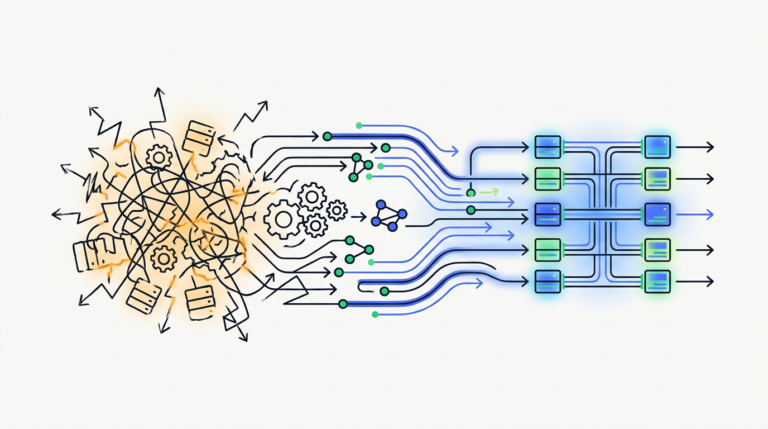
Enterprise-level data extraction isn’t about running a script on your laptop. It’s about building a resilient system that fetches business-critical data, 24/7, without human intervention. This system has to handle thousands of pages, navigate complex logins, defeat anti-bot measures, and deliver clean, structured data into your business intelligence tools.
The problem is that the web is actively working against you. Websites use dynamic JavaScript to load content, which breaks simple scrapers. They deploy sophisticated anti-blocking services that detect and ban automated traffic. At scale, simple scripts crumble under the weight of network errors, proxy failures, and site changes.
Playwright, a modern browser automation library from Microsoft, was built to solve this. It doesn’t just request a URL; it drives a real, headless browser (like Chrome, Firefox, or Safari’s WebKit) just like a human would. This approach makes it fundamentally more resilient and capable than older tools, providing the solid foundation needed for a scalable scraping infrastructure.
Enterprise web scraping is the practice of extracting large volumes of data from the web in a scalable, reliable, and compliant way to support business operations. Unlike small-scale scraping, it involves robust infrastructure, advanced anti-blocking techniques, data validation pipelines, and strict adherence to legal and ethical standards.
You have choices for browser automation, but for a new enterprise project, Playwright is the decisive winner. It’s not just a minor improvement; it represents a fundamental shift in reliability and developer experience.
Many modern websites are built as Single-Page Applications (SPAs). Think of it like this: you load the website once, and then as you click around, content appears to change without the page ever fully reloading. This is all handled by JavaScript running in your browser, a process called client-side rendering.
Older tools struggle with this. They might grab the page’s HTML before the JavaScript has finished its work, resulting in missing data. Playwright, because it operates a full browser engine, naturally handles this. It waits for the JavaScript to run and the content to appear on the page before it tries to extract it. It sees what a user sees, which is the only thing that matters.
This is Playwright’s killer feature. In the old world of Selenium, a developer had to litter their code with fragile “wait for 5 seconds” commands, essentially guessing how long a page element might take to load. This is a primary source of failure.
Playwright has “auto-waits” built-in. When you tell it to click a button, it automatically waits for that button to actually exist, be visible, and be clickable. This single feature eliminates an entire class of common scraping errors. Production-grade automation is all about resilience, and by removing the guesswork, Playwright builds that resilience right into its core design.
While Selenium has been the workhorse for years, its age is showing. Playwright, created by the original team behind Google’s Puppeteer, learned from the past to build a better future.
| Tool | What It Is | Key Strength | Key Weakness | Our Verdict |
|---|---|---|---|---|
| Playwright | A modern, multi-language browser automation framework from Microsoft. | Incredible reliability with auto-waits and true cross-browser support (Chromium, Firefox, WebKit). | Younger ecosystem than Selenium, so fewer third-party tools (though it’s catching up fast). | The best choice for new projects. The reliability and developer experience are unmatched. Start here. |
| Selenium | The long-standing, open-source standard for browser automation. | Massive community, extensive documentation, and support for almost every language. | Flaky and slow compared to modern tools. Lacks native auto-waits, leading to brittle scripts. | Use it if you’re maintaining a legacy project. For anything new, choose Playwright. |
| Puppeteer | A Node.js library from Google for controlling headless Chrome/Chromium. | Excellent, deep control over the Chrome browser and its developer tools. | Primarily focused on Chromium; cross-browser support is not its core design. | A great tool, but Playwright offers the same power with better cross-browser capabilities out of the box. |
Getting started with Playwright is straightforward for a developer. It can be used with several popular programming languages, including Python, Node.js (JavaScript/TypeScript), Java, and .NET.
The process involves two main steps:
pip for Python, npm for Node.js).From there, a simple script can launch a browser, navigate to a page, and extract information. While the setup is simple, building a full enterprise pipeline around it is where the real work begins.
Playwright handles complex, dynamic websites by using a real browser engine (like Chromium, Firefox, or WebKit) to render pages. It executes all the site’s JavaScript, just like a user’s browser would. Combined with its “auto-wait” feature, Playwright ensures it interacts with elements only after they have fully loaded and become visible, capturing the final state of the page accurately.
The most effective anti-blocking techniques for Playwright go beyond simple IP rotation. A robust strategy involves rotating high-quality residential or mobile proxies, modifying the browser fingerprint to mimic real users, integrating third-party CAPTCHA solving services, and using intelligent retry logic to handle temporary blocks gracefully.
Websites don’t just block you based on your IP address. They use a technique called “browser fingerprinting” to identify and track you. This involves collecting dozens of data points your browser leaks: your screen resolution, installed fonts, browser version, operating system, and more. Together, these create a unique signature.
Basic scrapers have obvious, robotic fingerprints. Advanced Playwright pipelines use tools to modify these characteristics, making each scraper session appear as a unique, legitimate human user on a standard computer. This is a critical step in avoiding detection on sophisticated sites.
No matter how good your evasion techniques are, you will eventually face a CAPTCHA. At an enterprise scale, you can’t have a human sitting there solving them.
The solution is to integrate your scraping pipeline with a CAPTCHA-solving service like 2Captcha or Anti-CAPTCHA. When your Playwright script detects a CAPTCHA, it sends the puzzle to the service’s API. The service uses human workers or its own AI to solve it and returns the answer, which your script then submits to the website to proceed.
This is where scraping infrastructure becomes truly intelligent. Instead of just reacting to blocks, you can build a system that learns from them.
This involves comprehensive logging of every scrape attempt: which proxy was used, what fingerprint was presented, what actions were taken, and whether it succeeded or failed. This data can be fed into a simple machine learning model to identify patterns. For example, it might learn that “IPs from this provider get blocked after 15 page views on this site.” The system can then use this insight to proactively adjust its strategy, like automatically rotating the IP and fingerprint after 14 page views. This turns your scraping stack from a dumb tool into a self-optimizing system.
A single Playwright script is not an enterprise pipeline. To scrape millions of pages reliably, you need a distributed system. The goal is to build an engine so people do only the work that needs a human.
Docker is a tool that lets you package your Playwright scraper—along with all its code, dependencies, and even the browser itself—into a neat, self-contained unit called a container. It’s like putting your entire workshop into a standardized shipping container.
Kubernetes is the port authority for all your containers. It’s an orchestration platform that manages your fleet of Dockerized scrapers. You can tell Kubernetes, “I need to run 50 instances of my scraper at all times,” and it will handle deploying them across multiple servers, replacing any that crash, and balancing the load between them. This is the foundation of modern, scalable scraping infrastructure.
For scraping jobs that are infrequent or have unpredictable demand, running servers 24/7 can be wasteful. Serverless platforms like AWS Lambda or Google Cloud Functions offer a more cost-effective model.
Think of it like this: instead of renting a whole server (the kitchen), you just pay for the few minutes your scraper is actually running (the oven is on). You can trigger a serverless function to run your Playwright script on a schedule or in response to an event. It scales automatically to handle thousands of parallel runs and then scales back down to zero, so you only pay for what you use.
If you have a million URLs to scrape, how do you manage the work? You don’t. You let a queue do it.
A distributed queue (like Amazon SQS or RabbitMQ) is a central to-do list for your scrapers. You add all one million URLs to the queue as individual “tasks.” Your fleet of scrapers, running in Kubernetes or as serverless functions, acts as workers. Each worker asks the queue for a task, scrapes the URL, puts the data somewhere, and then asks for the next task. This makes the system incredibly resilient. If one scraper crashes, the task simply goes back into the queue for another worker to pick up.
Extracting data is only half the battle. Raw, messy data is useless. The real value comes from transforming it into clean, reliable information that can power business decisions.
Data scraped from the web is inherently untrustworthy. Prices might be missing, product names might have extra HTML tags, and dates could be in the wrong format. Before this data enters your systems, it must be cleaned and validated.
This involves a dedicated step in your pipeline that:
price field contain a number? Is the product_id field present? If the data fails validation, it should be flagged or sent to a separate queue for inspection.Once validated, the data needs a permanent home where it can be analyzed. This is typically a cloud data warehouse like Google BigQuery, Amazon Redshift, or Snowflake. Your pipeline should be configured to load the clean data into structured tables in the warehouse, making it immediately available to your data analysts and business intelligence tools like Tableau or Looker.
A silent failure is the most dangerous kind of failure. You need to know when your pipeline is broken. This requires setting up automated monitoring and alerting on your data quality.
Examples include:
These alerts are the immune system for your data pipeline, letting you detect and fix problems before they impact the business.
Building a system that lasts requires discipline and a focus on resilience.
Things will fail. Networks are unreliable, websites go down, and proxies die. Your code must anticipate this. Don’t let a single failed request kill an entire job. Implement smart retry logic: if a page fails to load, wait a few seconds and try again. If it fails three times, log the error and move on to the next task. If a proxy is blocked, automatically discard it and fetch a new one from your pool.
You can’t fix what you can’t see. Your scrapers should produce detailed logs for every significant action: starting a job, fetching a URL, extracting data, encountering an error. These logs are essential for debugging.
Furthermore, you should monitor the performance of your pipeline. Track metrics like average page load time, the success rate of your scrapes, and the number of tasks processed per minute. This allows you to spot performance degradation and identify bottlenecks in your system.
Web scraping operates in a legally and ethically complex space. For an enterprise, “ask for forgiveness, not permission” is not a viable strategy.
If your scraping activities involve any “personally identifiable information” (PII)—names, email addresses, phone numbers, etc.—of individuals in Europe or California, you are subject to the GDPR and CCPA, respectively. These regulations come with strict rules about data collection, processing, and user consent. The fines for non-compliance are severe.
The simplest guidance for enterprise scraping is this: avoid scraping personal data. If your use case absolutely requires it, you must consult with legal counsel to ensure you have a legitimate legal basis for doing so.
Most websites have a Terms of Service (ToS) document that explicitly forbids automated access or scraping. While the legal enforceability of ToS against scraping public data is a contested issue (the hiQ Labs v. LinkedIn case set a key precedent), violating them can still lead to consequences. A company can block your IP addresses, send you a cease-and-desist letter, or, in rare cases, pursue legal action.
The enterprise approach is about risk mitigation:
To build a scalable Playwright infrastructure, you containerize your scraper application using Docker. You then use an orchestrator like Kubernetes to manage and scale these containers across multiple servers. For task management, you implement a distributed message queue like Amazon SQS or RabbitMQ to feed URLs to your fleet of scraper “workers,” ensuring resilience and efficient distribution of work.
The legality of web scraping is a complex gray area and depends heavily on what you scrape and how you do it. Scraping publicly available, non-personal data is generally considered lower risk but may still violate a website’s Terms of Service. Scraping copyrighted content or personal data protected by laws like GDPR and CCPA carries significant legal and financial risks. Always consult with legal counsel before starting an enterprise scraping project.
Can Playwright log into websites?
Yes, absolutely. Playwright is excellent at handling authenticated data extraction. It can fill out login forms, handle multi-factor authentication (MFA) prompts, and maintain session cookies, allowing you to scrape data from behind a login wall just as a human user would.
Which is better for beginners, Playwright or Selenium?
Playwright is better for beginners. Its modern API is more intuitive and requires less code to accomplish the same tasks. Crucially, its built-in auto-wait functionality saves beginners from the most common and frustrating source of errors in Selenium: timing issues.
Does Playwright work with Python?
Yes, Playwright has first-class support for Python, as well as Node.js (JavaScript/TypeScript), Java, and .NET. The Python library (playwright-python) is very popular and well-maintained.
How much does Playwright cost?
Playwright itself is a free, open-source tool provided by Microsoft. However, running playwright enterprise web scraping pipelines at scale incurs costs for the underlying cloud infrastructure—the servers (or serverless functions), proxies, CAPTCHA solving services, and data storage you use.

Part of the Thinker's Automation Labs content team. Researches with the SEO Blog Research Agent, drafts the piece, and routes it through review before publishing. Every claim is fact-checked against primary sources.
AI workflow automation uses artificial intelligence to manage and execute complex, multi-step business processes. It goes beyond simple…

Event-driven workflow orchestration is a system where a central service manages and coordinates tasks. Unlike scheduled jobs, these…
Resilient automation architecture is a design approach for building automated systems that can withstand failures and continue operating.…